
Download Text to Speech.im – Free AI‑Powered Text‑to‑Speech Converter
Overview
Text to Speech.im is a free online application that transforms written text into natural‑sounding speech with just a few clicks. Powered by advanced artificial intelligence, the service supports dozens of languages and a rich selection of voice profiles, including male, female, and child tones. What sets it apart is the multi‑emotion voice capability that injects subtle feelings—such as excitement, calmness, or curiosity—into the audio, creating a truly lifelike listening experience.
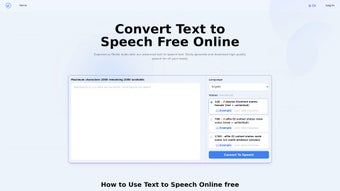
The platform is browser‑based, so there is no need to download bulky software; however, generated audio files can be saved locally for offline playback, making the tool ideal for personal projects, educational resources, marketing videos, or accessibility solutions. The user interface is clean and intuitive: paste or type your text, choose a language and voice, adjust emotional intensity, then press “Generate.” The resulting MP3 or WAV file is ready for immediate download. Whether you are a content creator looking to add narration to a YouTube video, a teacher preparing audio lessons, or a person with visual impairments who needs read‑aloud support, Text to Speech.im delivers high‑quality, customizable speech without cost or complex setup.
Key Features
- AI‑Driven Natural Voices: Deep‑learning models produce speech that mimics human intonation, rhythm, and breath control.
- Multi‑Language Support: Over 30 languages and dialects, from English and Spanish to Mandarin and Arabic.
- Voice Variety: Choose from male, female, and child voices; each voice comes with multiple emotional presets (happy, sad, neutral, excited, calm).
- Long‑Form Text Handling: Process paragraphs up to 5,000 characters in a single request, perfect for articles, scripts, or e‑books.
- Instant Playback & Download: Preview generated speech in‑browser and download as MP3 or WAV with a single click.
- Accessibility Focus: Supports screen‑reader friendly output, benefiting users with visual impairments or dyslexia.
- No Registration Required: Use the tool anonymously; optional account creation unlocks history saving.
- Secure & Private: All text is encrypted during transmission and deleted from servers after processing.
- Free Tier & Affordable Upgrades: Core functionality is free; premium plans offer higher character limits and commercial‑use licensing.
- Cross‑Platform Compatibility: Works on any modern browser—Chrome, Firefox, Safari, Edge—on Windows, macOS, Linux, Android, and iOS.
Installation, Usage & Compatibility
Getting Started – No Installation Needed
Because Text to Speech.im is a web‑based service, there is nothing to install on your computer or mobile device. Simply navigate to texttospeech.im using a supported browser. The site automatically detects your operating system and adapts the layout for optimal performance on desktop, tablet, or smartphone screens.
Step‑by‑Step Usage Guide
- Enter Your Text: Paste or type directly into the large text box. The tool accepts plain text, HTML (stripped of tags), and even markdown formatting.
- Select Language & Voice: Choose your desired language from the dropdown, then pick a voice profile. For added nuance, toggle the “Emotion” slider to set the tone (e.g., “Excited” for marketing copy, “Calm” for meditation guides).
- Adjust Settings (Optional): You can fine‑tune speech speed, pitch, and volume using the sliders beneath the voice selector.
- Generate Speech: Click the bright “Generate” button. The AI processes the request in seconds, and a playback bar appears.
- Preview & Edit: Listen to the audio. If you need changes, edit the text or settings and regenerate—no additional cost.
- Download: Once satisfied, click “Download MP3” or “Download WAV.” The file is saved locally, ready for integration into presentations, podcasts, or social media posts.
System Requirements & Operating Systems
The platform runs on any device that supports HTML5 and JavaScript. Recommended browsers and minimum versions are:
- Google Chrome 80+
- Mozilla Firefox 78+
- Apple Safari 13+
- Microsoft Edge 85+
Because the processing occurs on remote servers, even low‑end devices can generate high‑quality audio without taxing local CPU or RAM. The only requirement is a stable internet connection; a broadband speed of 5 Mbps or higher ensures smooth operation for longer texts.
For mobile users, the responsive design works seamlessly on Android 8.0+ and iOS 13+. The same steps apply, with touch‑friendly controls for text entry and voice selection. No additional app stores or permissions are needed, keeping the experience secure and lightweight.
Pros, Cons & Frequently Asked Questions
Pros
- Completely free for basic usage – no hidden fees.
- AI‑generated voices sound natural and expressive.
- Supports a wide range of languages and regional accents.
- Emotion sliders add depth to the audio output.
- No software installation; works directly in the browser.
- Secure data handling with automatic deletion after processing.
- High‑quality MP3 and WAV downloads for offline use.
- Accessible design benefits users with visual or reading impairments.
- Responsive layout works on desktops, tablets, and smartphones.
- Optional premium plan for commercial licensing and higher limits.
Cons
- Requires an internet connection; offline generation is not possible.
- Free tier limits each request to 5,000 characters; larger projects need a paid plan.
- Advanced voice customization (e.g., custom voice cloning) is not available.
- Occasional latency during peak usage times due to server load.
- No native desktop or mobile apps; all interactions happen via a web page.
FAQ
Is Text to Speech.im really free?
Yes, the core functionality—converting up to 5,000 characters per request—is completely free. Premium subscriptions are optional and provide higher limits, commercial licensing, and priority processing.
Can I use the generated audio for commercial projects?
Commercial use is permitted under the paid plan. The free tier is intended for personal, educational, or non‑commercial purposes only.
What file formats are available for download?
You can download the speech output as MP3 (compressed, widely compatible) or WAV (lossless, higher quality). Both options are provided after generation.
How secure is my text data?
All text is transmitted over HTTPS, encrypted end‑to‑end. After the speech is generated, the server automatically deletes the original text within a few minutes, ensuring privacy.
Does the tool support right‑to‑left languages like Arabic or Hebrew?
Yes, Text to Speech.im includes full support for right‑to‑left scripts, delivering accurate pronunciation and proper intonation for Arabic, Hebrew, Persian, and similar languages.
Final Verdict & Call to Action
Text to Speech.im delivers a compelling blend of accessibility, flexibility, and natural‑sounding AI voices—all without demanding a download or a subscription for everyday use. Its multi‑emotion capabilities and extensive language library make it a standout choice for creators, educators, and anyone who needs reliable speech synthesis. While the reliance on an internet connection and the character limit on the free tier may be minor drawbacks, the overall value is hard to beat. If you’re looking for a quick, secure, and free way to turn text into high‑quality audio, give Text to Speech.im a try today. Click the button below to start generating speech instantly.
Start Generating Speech Now


.png)



